Skip to content
CLUP.life

What’s new at CLUP.life

New and significantly improved features, newest first. You can read this without an account.

Create accountSign in

November 2026

  1. New

    RSVP without an account, find dates together

    For every event you create a link that lets people without an account accept or decline – with a nickname, no sign-up. With the date poll, members and guests vote on several suggested dates, and one click creates the event.
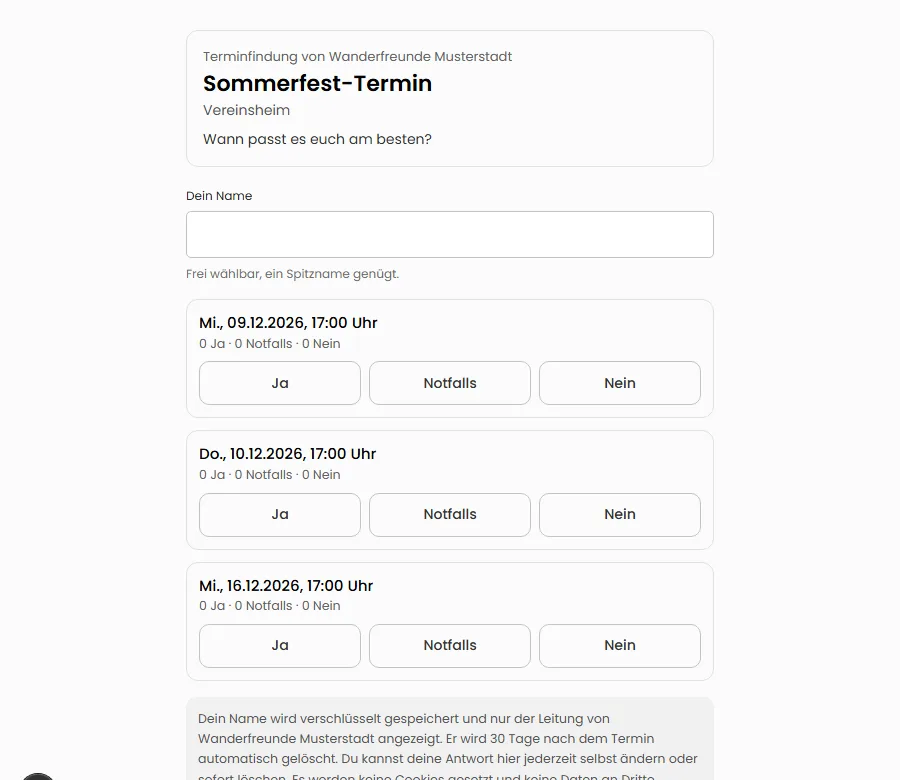
    Public voting page of a date poll with three suggested dates and the buttons Yes, If needed and No
  2. Improved

    Reports in your association's format, cash book and DATEV

    The membership report now follows the structure of common sports associations and comes as Excel or a printable sheet; associations see the response rate, remind late clubs and compare with the previous year. New: a cash book for cash and bank with daily closing and cash count; the DATEV export follows the booking batch format more closely.

  3. New

    Move from WhatsApp in an hour

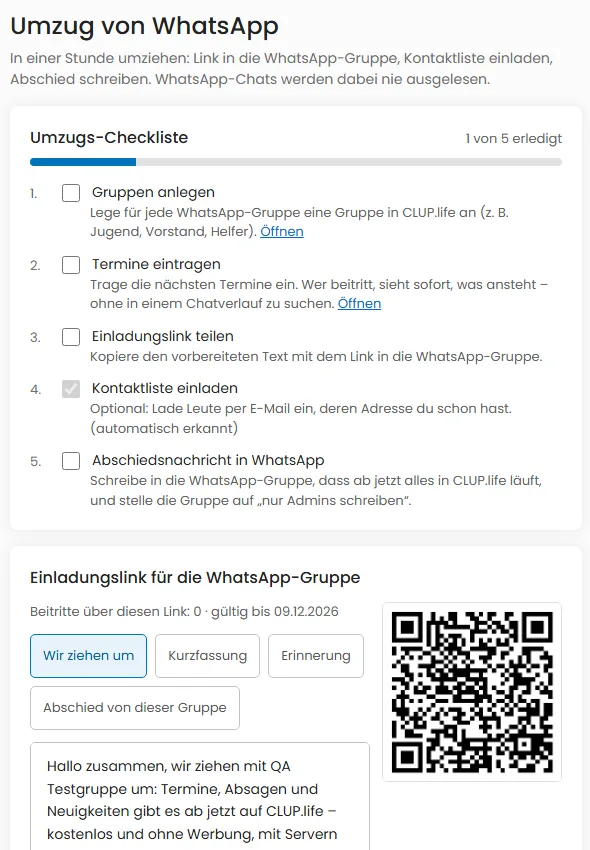
    The new switch assistant brings your club from WhatsApp to CLUP.life: an invitation link with ready-made texts for the group and a QR code, inviting a contact list by email and a move checklist with a progress bar. WhatsApp chats are never read.

    Move from WhatsApp page with move checklist, progress bar and invitation link with text blocks and QR code
  4. New

    Request payments and sell tickets – without money passing through CLUP.life

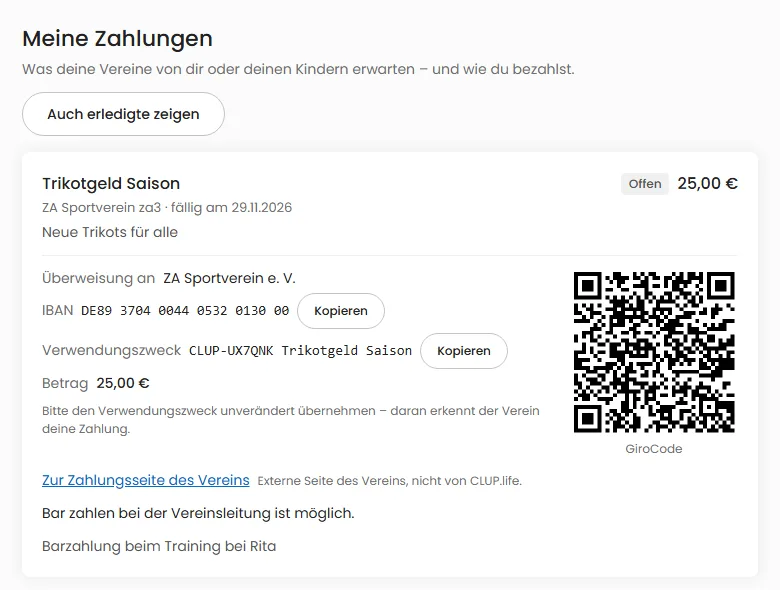
    Club leadership can request dues, travel costs or jersey money from members, a group or everyone who accepted an event. Everyone sees the club’s payment method with a payment reference code and GiroCode; leadership records the payment, by bank statement matching (Premium) or one by one. Events get tickets with a QR code and entry scanning.

    The “My payments” page with a payment request for jersey money, the club’s payment method and a GiroCode to scan in the banking app.
  5. Improved

    Preview shows the CLUP.life note per network

    When sharing to social networks, every post ends with a “Posted via CLUP.life” line including the address. The preview shows it per network with the character count; it is never cut off.

  6. New

    All features at a glance – with a brochure

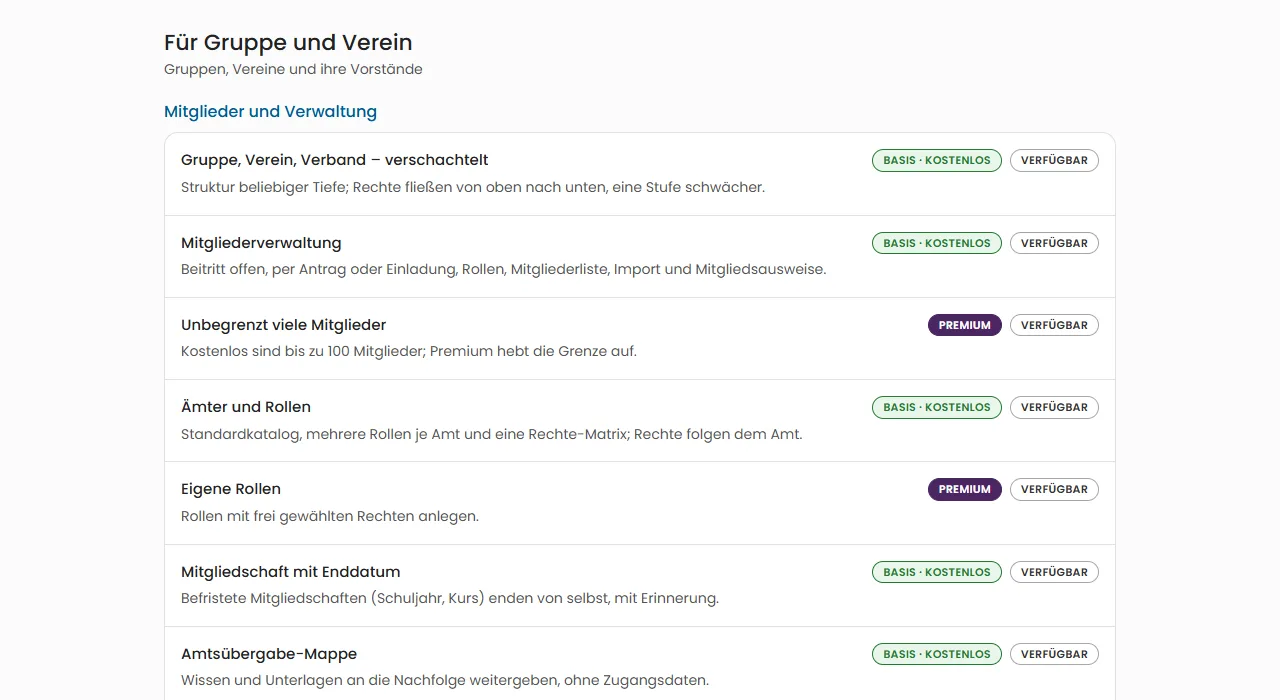
    The new Features page lists everything CLUP.life can do, split into individuals, groups and clubs, and federations and municipalities – marked Basic or Premium and honestly split into available and planned. A PDF brochure in German and English is available, too.

    Excerpt of the features page: list of functions for groups and clubs marked Basic, Premium and available
  7. Improved

    Maps: more precise, with events and people

    A club's page now shows its location on our own map, with street and house number if the club allows it. Search has maps for events and for people who choose to show themselves. Everything stays on our servers.

  8. New

    News feed for your club’s website

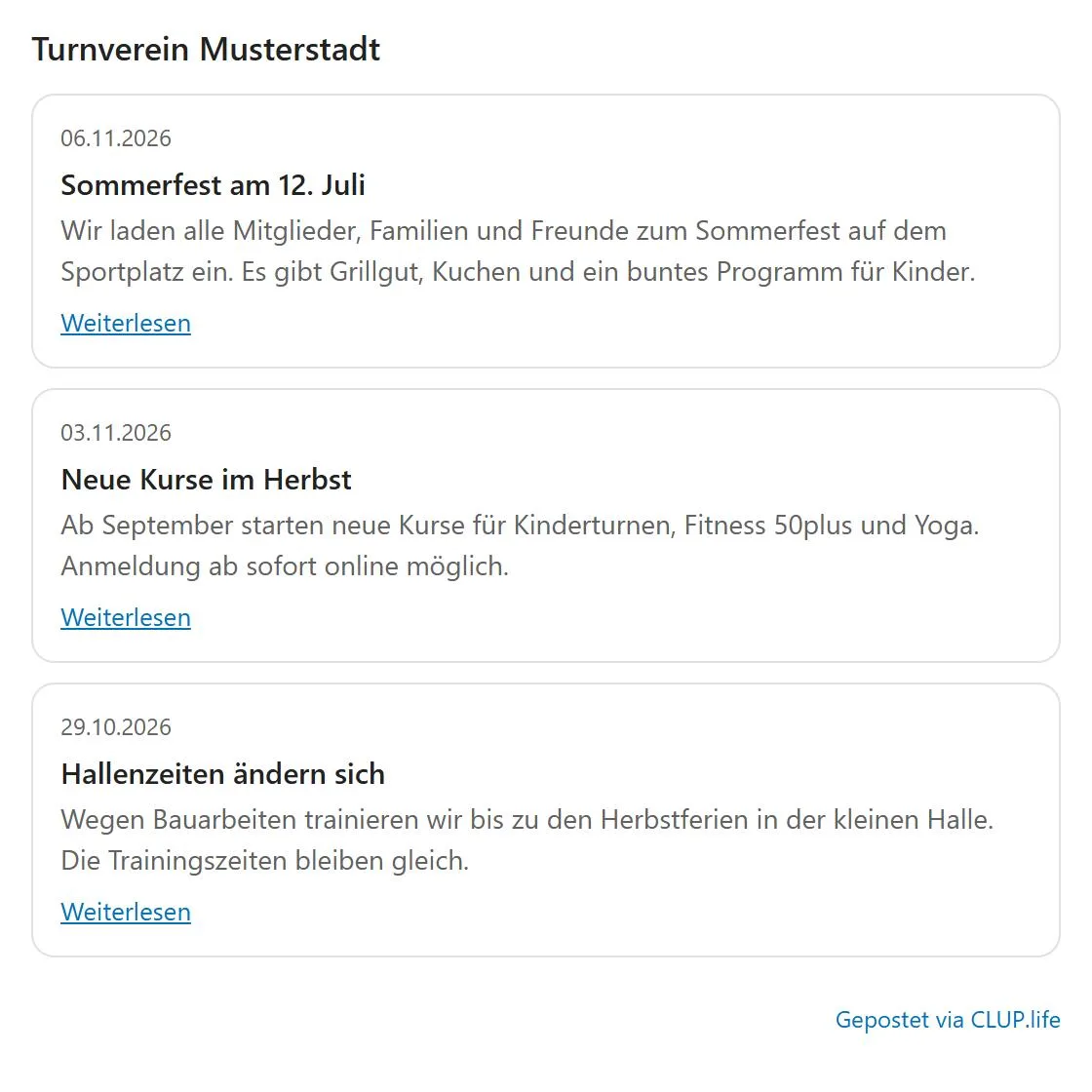
    Show your club’s public posts on your own website: as an embeddable widget (light or dark) or as a feed for feed readers and website builders. Only public posts appear, without names, images and comments – no cookies and no tracking.

    Embedded news widget with three posts of the fictional gymnastics club Musterstadt and the note “Posted via CLUP.life”
  9. New

    Sharing, photo permission and emergency contacts

    You decide whether the leader of an event sees your details on allergies, medication and conditions: always, ask every time or never. There is also a tiered photo permission and hidden emergency contacts that only the event leader can retrieve in an emergency – every access is logged and reported to you.

  10. Improved

    Facilities: reach, pricing basis and flexible rules

    You decide who may see and book a facility: only the organization, the association too, or everyone. Prices can be per hour, half day, day, participant or flat. Lead time, maximum and minimum duration, booking horizon and grid can be set from minutes to months, and you pick accessibility from the catalog — with a filter in the list.

  11. Improved

    Install CLUP.life as an app: now also in the menu

    You can dismiss the install hint without losing the option: the “Me” menu (on phones under “More”) shows “Install app” as long as the app is not installed. On iPhone and in browsers without an install prompt, a short guide explains the steps.

  12. New

    Task lists and “My tasks”

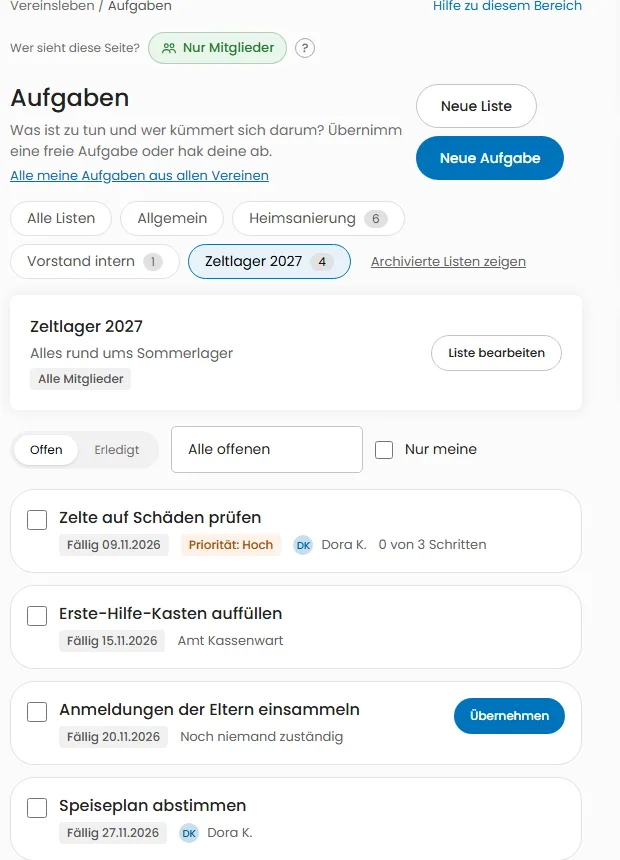
    Every club, association and group can keep several task lists – tasks can be assigned to people, offices or groups. “My tasks” shows everything you have to do across all your clubs, sorted by due date.

    Task list “Summer camp 2027” with four tasks, due dates, priority and assignees
  13. Improved

    Share posts automatically and keep track of distribution

    Administrators can switch on that new public posts appear automatically after ten minutes as text with a link on connected networks – never with images, never retroactively, and any post can be excluded. Each post's menu shows where it was distributed. More networks follow once the platforms approve.

  14. New

    Who is in this chat? Member list in the chat header

    In group, club, office and role chats, the people icon in the chat header shows who is in the chat — with search. The list follows your club's setting (leadership only or all members), children appear with display names only, and in very large chats you find people through the name search.

  15. Improved

    A real map for club search

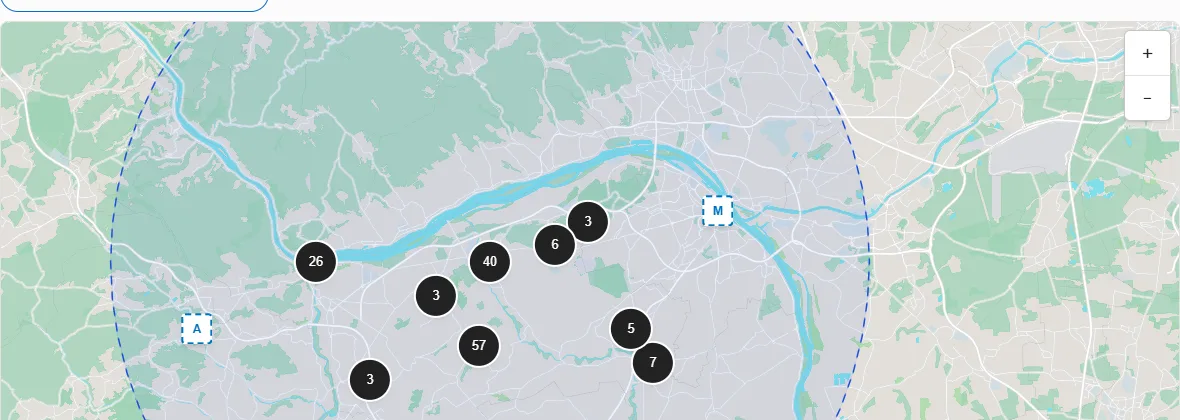
    The map in “Discover” now shows roads, places and waters instead of an empty grid. The map data comes from our own server: nothing is sent to third parties and your location is not requested. Grouped results split up as you zoom in, and the map can also be used with the keyboard.

    Club search map around Ingelheim with roads, the Rhine and forests, showing grouped markers with result counts and single club markers inside a dashed search circle.
  16. New

    Family: shares, own access from 10, reading along with a notice

    You can share the time and place of your club events with family or contacts. Parents can allow children from 10 their own access, decide who may write to them and openly read along for ages 10 to 12 – visible to everyone. At 16 the account belongs to the person alone.

  17. New

    Write to functions: messages to the clubhouse warden and other offices

    Visitors, members and federations can now write to a function such as “clubhouse warden” instead of a single person. Everyone who holds the function sees the message in a shared inbox, replies in the name of the function and shares status, notes and templates. The leadership decides per function whether and for whom it is reachable – publicly only the name of the function is shown, never a person’s name.

  18. Improved

    Calendar: events at their real length and multi-day events as bars

    In the day and week views every event now has the height of its duration, and overlapping events sit side by side. Camps and weekends appear as one continuous bar across all their days, all-day events in a strip above the timeline. Events without an end time are marked as such.

  19. New

    Your child as a member: child profile without own access

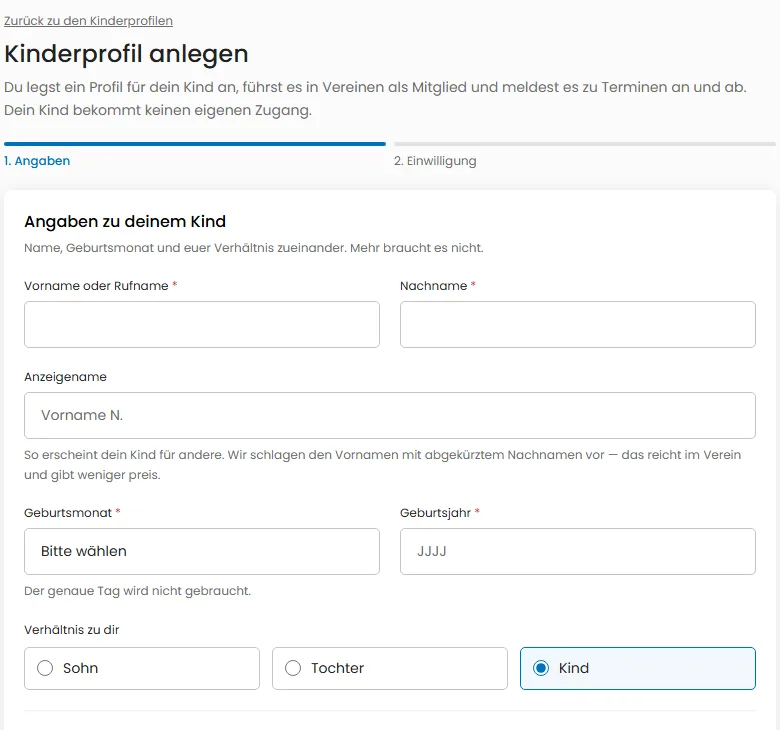
    Create a profile for your child with first name, last name, birth year and month — without own access and without a copy of your contact details. You manage it as a member of clubs and groups and sign it up for and out of events and trips. The profile can never be found and is never in chats; all notifications go to you.

    The “Create child profile” form with the fields first name or nickname, last name, display name, birth month, birth year and relationship to you.
  20. New

    Schedule news: publish a post at a later time

    You can now schedule a post for later, up to a year ahead. Until then only you and the leadership see it under “Scheduled posts” — where you can edit, reschedule, publish immediately or cancel it. At the chosen time it appears in the news by itself; mentions and sharing to social networks follow only then.

  21. New

    Add past news: set the publication date

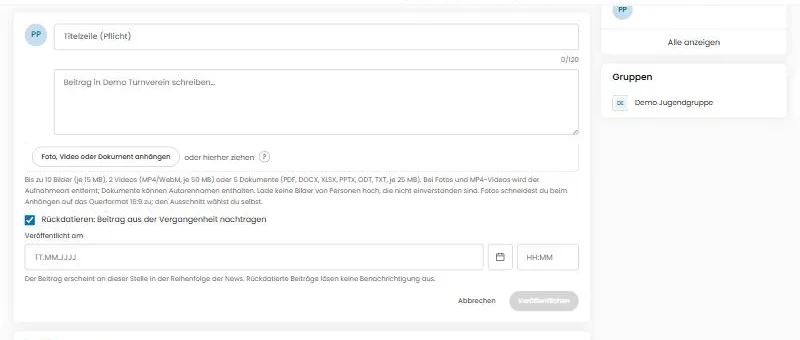
    You can now add posts from the past: when writing news you can choose an earlier publication date, also later when editing. Posts appear in the order of their date; backdated posts do not trigger notifications.

    News composer with the checkbox “Backdate: add a post from the past” and date and time fields for “Published on”.
  22. Improved

    Organization page tidied up

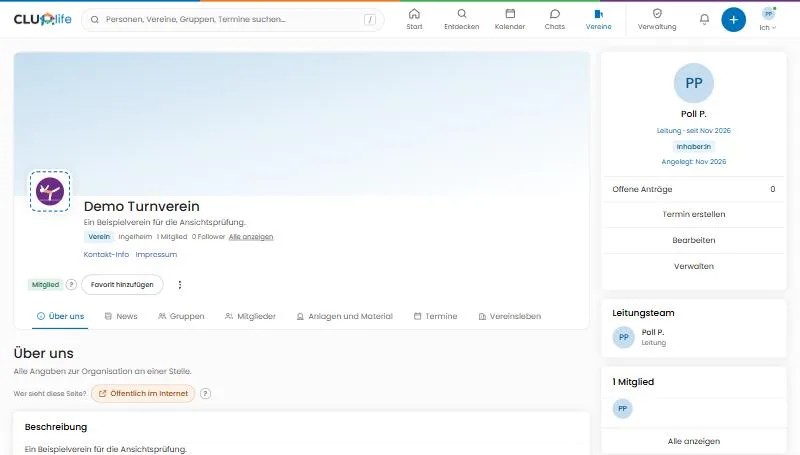
    Fewer tabs, a better overview: “Start” and “About us” are now one page, “Help” lives in Club life, the legal notice sits next to “Contact info” in the header and “Manage” is below “Edit” in the right column. The three-dot menu now appears fully in front, and the parent organization shows its logo.

    Header of a club page with the tabs About us, News, Groups, Members, Facilities and materials, Events and Club life, the links Contact info and Legal notice, and Edit and Manage on the right.
  23. New

    Choose your own session length

    You now decide how long you stay signed in: a maximum session length and a sign-out after inactivity, from 15 minutes to 90 days. Shorter limits apply immediately on all devices, and a notice warns you before expiry. Club leadership and platform roles have shorter upper limits; for children the parents decide.

  24. New

    Donation appeals: pictures, donate directly and donor list

    Donation appeals now have pictures, can be edited and, if you wish, get a public page to share. Once the club has connected its payment account you can donate directly in CLUP.life – the money goes to the club's account, with a donation receipt on request. Names and amounts appear in a donor list only if both the club and the donor agree.

  25. New

    Sponsoring: club requests, logos and several profiles

    Becoming a sponsor is now easy to find: clubs post requests (for example for the Premium membership), sponsors apply and the club decides. You can manage up to five sponsor profiles with a logo. Amounts are only shown if the club and the sponsor agree.

  26. New

    Events: address, who may attend, reminders and accessibility

    Events now have street, postcode and town, a trip schedule with meeting point and return, and an agenda with times. You decide who may attend (open, after registration, members only, invited only), set your own reminders and see accessibility at a glance. Event search filters by place, who may attend, age and accessibility; the calendar filters by your attendance.

  27. New

    Events: video room, facilities and form

    An online event automatically gets a CLUP.life video room that opens 15 minutes before the start — only for those who accepted and the organizers, no recording. Organizers book facilities for the time of the event (per occurrence in a series, with suggestions on double booking) and attach a small form that registered people — and parents for their children — answer.

  28. Improved

    Groups take over location and category from their club

    When you create a group in a club, the club's location and category are suggested right away. As long as you enter nothing of your own, the group follows the club – if the club moves, the group is carried along automatically in search, map and filters. You can set your own values at any time and reset them to the club later.

  29. Improved

    Recurring events: change, cancel and reply one at a time

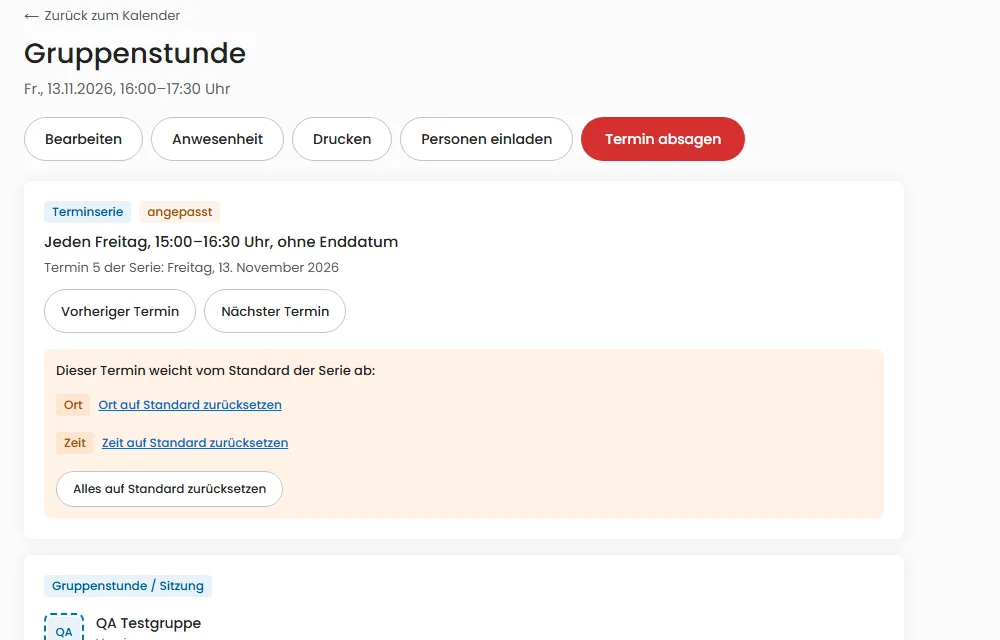
    You now edit a weekly meeting as in a calendar app: only this event, all that still follow the default, or all. Adjusted events are marked and can be reset. Replies apply to one event or the series, and you can cancel single events without ending the series.

    Event page of a weekly meeting showing “Event series, customized”, the rule “Every Friday, 3:00–4:30 PM, no end date”, links to the previous and next event, and the differing location and time with a reset button.
  30. New

    Acting for … with several family members

    Under Settings → Acting for … you choose who you act for by default on events, trips and credentials, and you can change it right in the account menu. Adults in your family can send event replies for you with your revocable authorization; the event page shows who replied.

  31. New

    News channel: your own posts, subscriptions and RSS sources

    Every person now has their own channel. You alone decide who sees it – at first only you. You can subscribe to other people’s channels and add club websites or blogs via RSS: only the title, an excerpt, the source and a link to the original are shown.

  32. New

    People search: you decide how you can be found

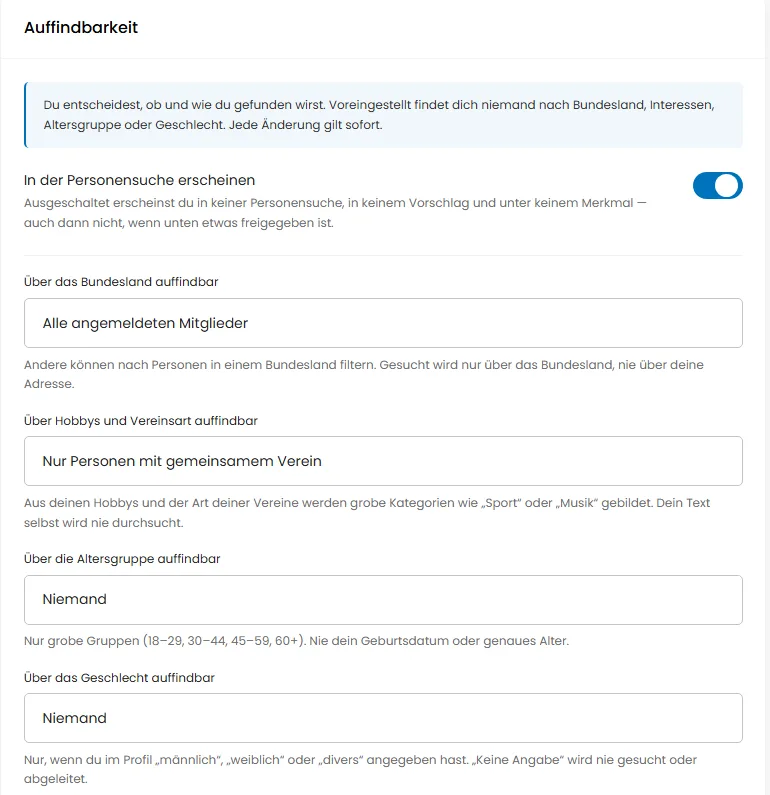
    The advanced people search finds people by state, hobbies, age group and gender, but only if they allow it. For each trait you decide who can find you (nobody, friends, club members, everyone on CLUP.life; name and state also everyone online), and one main switch removes you at once. Nothing is ever searched by religion, politics or health.

    Settings, discoverability section: main switch for the people search and one selector each for state, hobbies, age group and gender
  33. New

    Video calls for large groups, too

    Start a video call from any chat – directly with one person, and in groups with more than four people through our own video server in Germany. Camera, microphone and screen sharing are adjustable, and nothing is recorded. Child accounts can only call when their parents have allowed it.

October 2026

  1. New

    Automatic chats for clubs, offices and roles

    Every club, group, office and role now gets a chat automatically. Who takes part follows from membership and office: you join when you become a member and leave when you leave or your term ends. The club leadership decides whether newcomers see the history, how child accounts take part (only with their parents' approval) and what happens to the history when someone leaves.

  2. New

    Membership count for your association

    Report your member numbers by age group and gender to your umbrella association – numbers only, without names and only with your consent. Associations collect the reports of their clubs.

  3. Improved

    Discover clubs: with logos and advanced search

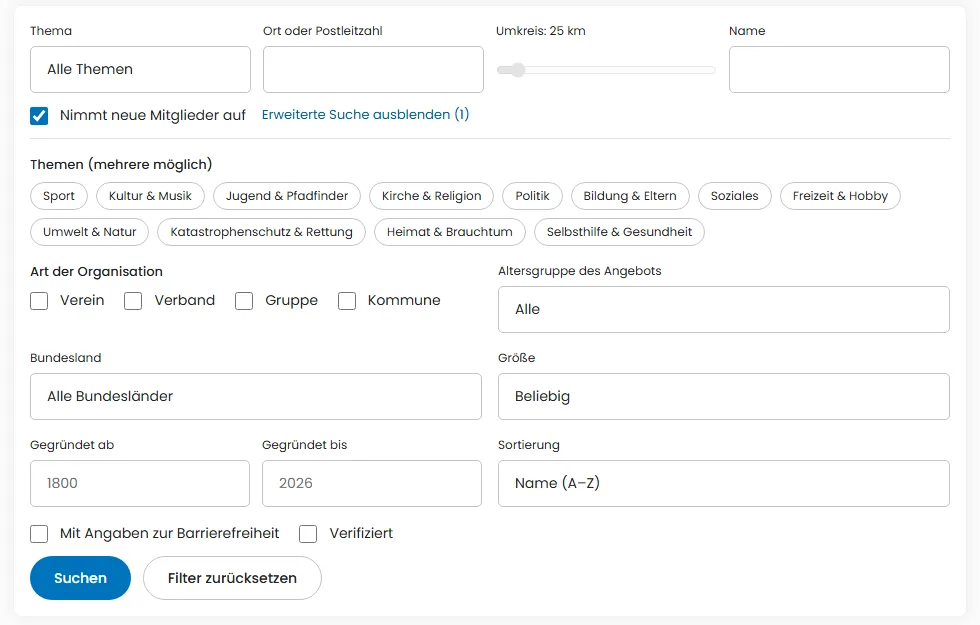
    The public “Discover clubs and groups” page now shows each club’s logo. Advanced search filters by several topics, type, age group, federal state, size and founding year – and the link can be shared.

    Expanded advanced search with topics, type, age group, federal state, size, founding year and sorting
  4. New

    Grants and proof of use

    Create grant projects, assign expenses from the journal and keep fund requests and deadlines in view. A checklist guides you through the proof of use; the PDF package is Premium.

  5. New

    Form templates for clubs

    Templates for the public order office, GEMA, resolutions and consents, prefilled with your club data, as PDF or Word file. The templates are not legally binding and do not replace advice.

  6. New

    Annual accounts and auditor package for the club treasury

    Treasurers and cash auditors get help with the annual accounts: an income and expense statement by sphere, treasurer’s report, reserves, export as Excel, CSV and PDF, an auditor package with sample and templates, and a checklist with deadlines for the tax return. These are working aids, not tax advice.

  7. New

    Calendar subscription for every club and team – free of charge

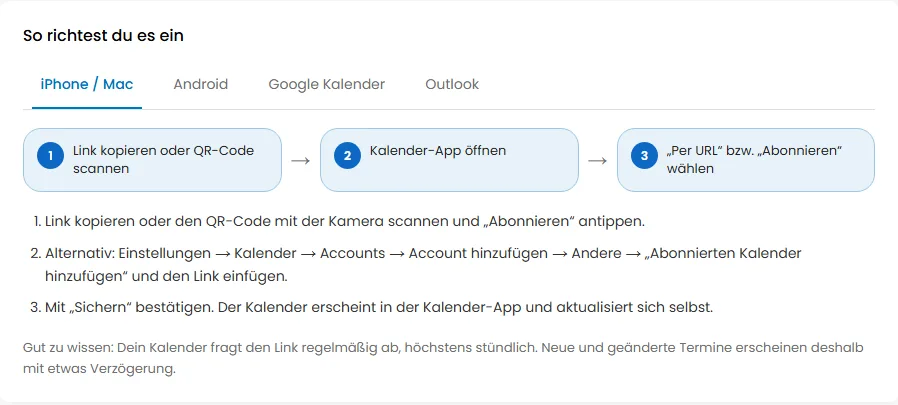
    You can now get the events of a club, group or team as its own subscription link in your phone calendar – with a QR code and step-by-step instructions for iPhone, Android, Google Calendar and Outlook. Add single events with “Add to calendar”; clubs can offer a public calendar for their website. All of it is free.

    Instructions for setting up the calendar subscription with tabs for iPhone, Android, Google Calendar and Outlook and three steps
  8. New

    Calendar and Messages: all settings in the three-dot menu

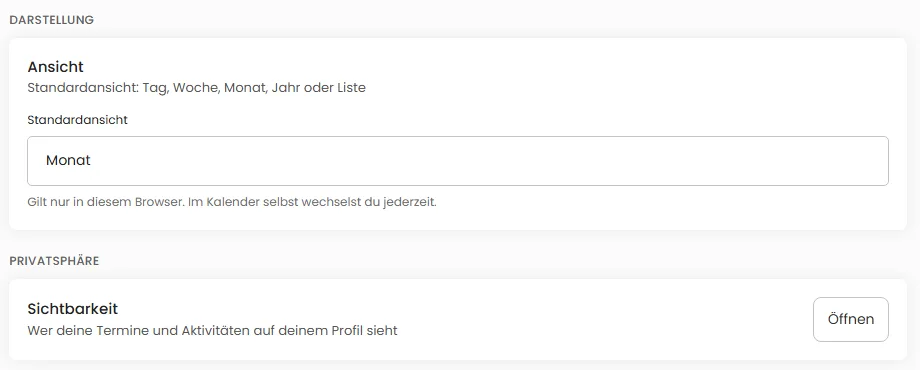
    In the calendar and in messages, the three-dot menu leads to all settings of that area: view, visibility, sharing, subscription, import and reminders. You will find the same settings under Settings as well – both ways open the very same setting, which is changed in one place only.

    Calendar settings page with the default view and the visibility entry
  9. New

    Insurance at a glance

    Record your club's insurance policies in one place. Expiry, notice period and premium payments remind the board in time. The gap analysis (Premium) shows which common policies are still missing.

  10. New

    Board change assistant and deadline calendar

    After a board election, CLUP.life prepares the register registration, letters to the bank, tax office, insurer and umbrella body, and a checklist. The deadline calendar shows obligations and reminds you in time. All texts are templates, not legal advice.

  11. New

    Handover folder for every office

    When the board changes, no knowledge gets lost: every office has a folder with instructions, a checklist, deadlines, documents and contacts. The successor can read it before taking office, and the predecessor keeps read access for 90 days afterwards. When an office is about to end, we remind you to plan the succession.

  12. New

    Matches and results

    Your team's games and competitions now appear in club life with opponent, venue, result and report. Members and parents see the result, the event team enters it, and Premium adds the season record.

  13. New

    Invitation to the general meeting with deadline check

    The assistant shows whether the invitation deadline from your bylaws can still be met and sends the invitation with read confirmation. Members without a digital route end up on a letter list, and the board sees who has read the invitation. With Premium you can freeze the proof as a PDF and remind everyone who has not confirmed yet.

  14. New

    Developer documentation for API, webhooks and MCP

    Everything about the CLUP.life interface is now public under “Developers”: a 5-minute quick start, reference, examples in curl, JavaScript and Python, webhooks, AI assistants (MCP) and a try-it console. Readable without an account.

  15. New

    Trips and camps: registration with consents

    For camps and trips, members and guardians register their children together, with consents, emergency contact and health information; without the guardian's confirmation no registration goes through. Leaders see the participant list, and health information is deleted automatically after the trip. Premium adds a printable emergency folder.

  16. New

    Non-profit status under control: annual check, ledger and cash audit

    The new assistant guides treasurer and cash auditors through the year: an annual check shows what is still missing for your non-profit status, a simple ledger records income and expenses per area, and the cash audit attaches its review note. Premium adds a traffic light for timely use of funds. A working aid, not a substitute for tax advice.

  17. New

    Child-protection register: certificates tracked, no copies kept

    Associations working with children and young people define which roles require a check and see at a glance where the certificate inspection is missing or due again. Only the date and the inspecting person are stored, never a copy. On request the youth office receives figures without names.

  18. New

    Memberships with an end date for support and parent associations

    Associations can set memberships to end with the school year or calendar year, or couple a member to their child: when the child leaves, the membership ends 30 days later. A reminder with one-click renewal arrives 30 days before. No stale member records are left behind.

  19. Improved

    New home page and one consistent menu bar

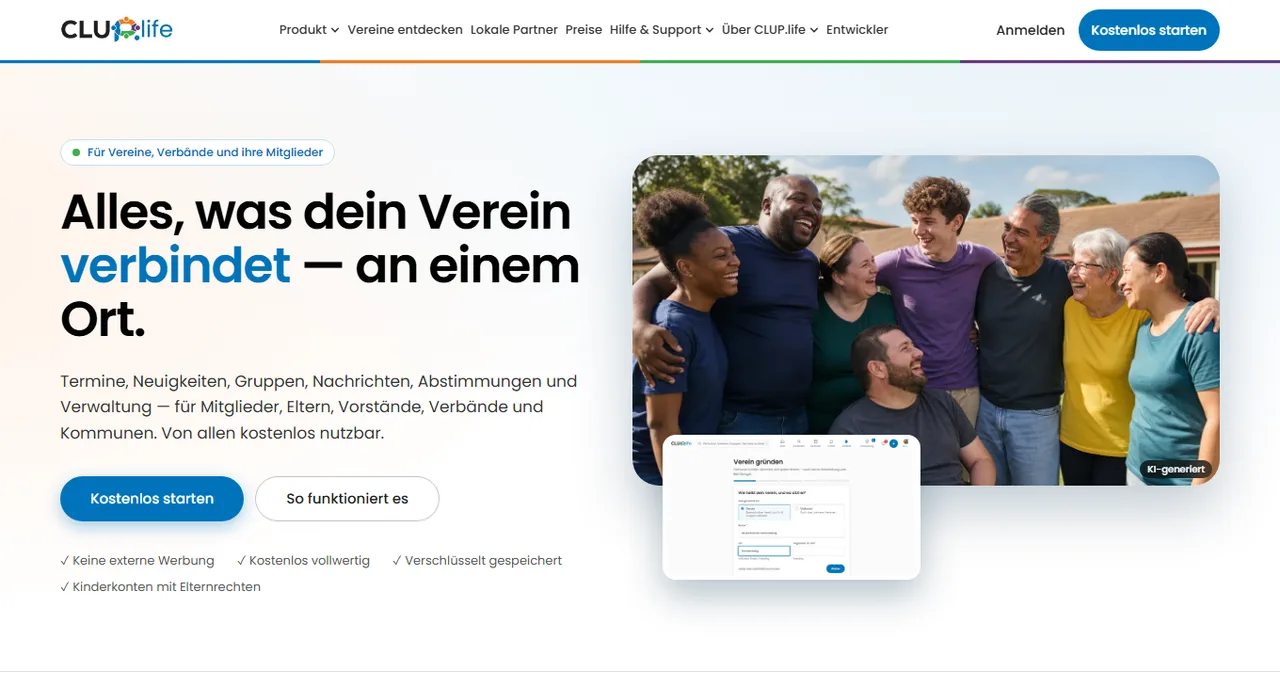
    One menu bar for all public pages, with drop-down menus for Product, Help and About CLUP.life. The home page now shows who CLUP.life is made for, what it looks like and how to start in three steps.

    New home page with menu bar, headline and a photo of laughing club members
  20. New

    Interfaces for programs and AI assistants

    With a personal key, calendar programs, automations such as Zapier or n8n and AI assistants such as Claude can read your events and posts — with exactly your rights and revocable at any time. Clubs with Premium also connect webhooks and write access.

  21. New

    Team fund with a fine catalog

    The team fund is now digital: set up a fine catalog, book fines, payments and expenses, and show everyone their own balance. The money stays with you, CLUP.life only keeps the ledger, and amounts are encrypted.

  22. New

    Who is available when? Availability for on-call duty

    Members voluntarily report the weekly times they are available for call-outs and can withdraw this at any time. Leaders see an hourly traffic light showing whether enough people are on standby, and only they see the names. With Premium you can set a minimum strength per role and evaluate when it is not met.

  23. New

    Election minutes and papers for the notary appointment

    After the board election, the club leadership is guided through the election minutes: invitation, quorum and acceptance of the election are checked before the minutes are closed. You also get a PDF with the checklist for the notary appointment and the board data as an export. This does not replace legal advice.

  24. New

    Collect replies with one click

    Whoever runs an event can now remind everyone who has not yet replied with a single click. For children the reminder goes to their legal guardians, and it follows each person's notification settings.

  25. New

    Offices with several roles

    An office can now grant several roles, for example treasury and sponsoring. There is a catalog of 20 standard roles from the chair to the cash audit, and the leadership can create custom roles with freely chosen rights. When the office ends, exactly its rights lapse.

  26. Improved

    Office email address: choose who sees it

    When creating an office, the club decides who sees its function email: only the leadership team, all members, all signed-in users or the whole internet. The default is the leadership team; private addresses are not allowed.

  27. New

    My data and who sees it

    One page shows everything about you – memberships, awards, contact details, posts – and lets you choose for each detail who sees it. Four consistent levels: leadership team, members, signed-in users, internet. The default is private; public only with your consent.

  28. New

    Admin log: who changed what?

    Leaders can now see in the admin log under “Club life” when who did what in the organization: members admitted or removed, roles and offices changed, settings adjusted, awards issued, lists exported. With filters for period, person and action, sorting and CSV export. With Premium, settings and role changes can also be reverted selectively.

  29. New

    Certificates and awards for members

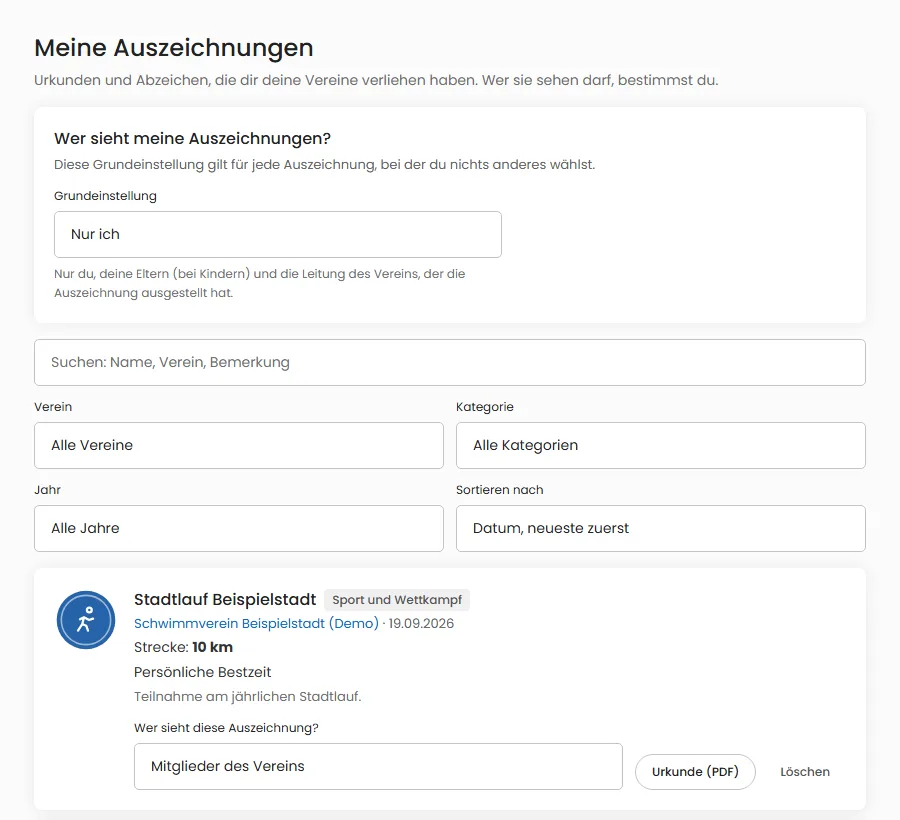
    Clubs, associations and groups can now award certificates and badges, from a first swimming badge to a marathon with the distance run. Everyone finds their awards under “My awards”, sorted and filtered, and decides who sees them; for children, the parents decide. The standard certificate as a PDF is free.

    “My awards” page with the visibility setting, filters and an award “Stadtlauf Beispielstadt” from a demo club
  30. New

    A landing page for every audience

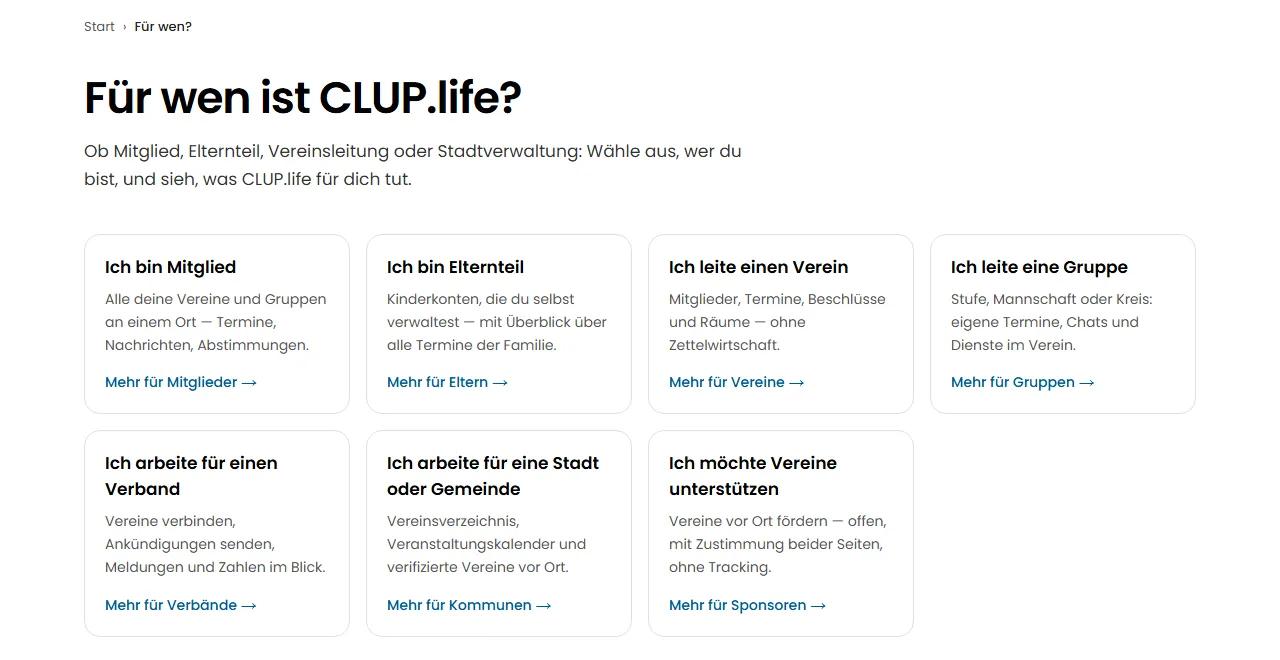
    Whether you are a member, parent, club board, association, municipality or sponsor: the public home page now asks “I am …” and leads to a page of its own with benefits, privacy, costs, a three-step start and common questions.

    “I am …” selection with cards for members, parents, clubs, groups, associations, municipalities and sponsors
  31. New

    CLUP.life is here

    CLUP.life is live: the social network for clubs, associations and groups. Here you can see everything the platform offers from day one, from setting up a club to events and chats to privacy and accessibility. You will find the topics below.

    Getting started, account and profile

    • Sign up with your email address and a verification code. On your first visit, a welcome page, “Getting started” and, if you like, a tour guide you through the most important paths.
    • The home page greets you, shows “Up next” and “Your reply is missing”, and can be filtered by family member and by organization. Calendar, events, news and messages sit side by side there.
    • Your profile: About me, hobbies, profile and cover photos, and up to 16 contact channels. For your profile picture you choose between your own photo with cropping, 25 drawn images and a figure you put together yourself.
    • Your display name is preset to “First name N.” (data minimization). You can set your full name yourself at any time.

    Setting up clubs, associations and groups

    • With the setup assistant you create a club, an association or a group. Groups exist within a club and on their own without a club; there are templates for five group types.
    • The structure runs from association to club to group. Anyone who joins a group also becomes a member of the club; an association shows its clubs and sub-units.
    • Your organization’s page has a cover photo, logo, color, “About us”, founding year, category, location, contact details and legal notice. The frame around the logo shows the type: group green, club blue, association purple, municipality orange.
    • You decide how people join: immediately, by request or by invitation only. Following is non-binding; you are only a member after joining or being invited.
    • When setting up, you accept the data processing agreement and the terms for organizations. You can find the record at any time in your organization.
    • If a club does not have an administrator yet, you can claim the administration with a short explanation; the higher-level body reviews the request.

    Members, roles and invitations

    • Roles: leader, administrator, moderator and member. Permissions apply one level weaker downward, so the administrator of an association has the permissions of a moderator in its clubs.
    • Administration reviews join requests, assigns roles, blocks members and sees followers. The member list is also available as a CSV export.
    • You can invite people with an account or by email, through an invitation link with a QR code and a printable flyer, or through an invitation list. The list never creates accounts itself; it only sends invitations after the leaders confirm.
    • Offices with terms are also available for people without an account; later they can be linked to an account with the person’s consent. You show role email addresses only to the leadership team or to all members.
    • Honors, anniversaries and birthdays only appear with the consent of the person concerned.
    • “Vouched for” seal: associations confirm their clubs, clubs confirm their members (only with your consent, never for child accounts). Cities and towns can apply as a municipality and maintain a public club directory.

    Events, calendar and RSVPs

    • Events with location, price and price tiers, participant limit with waitlist, comments and carpools. You decide whether an event is visible to the public, to members only or to invitees only.
    • You create regular events as a series. A group session stays at its usual time even after the clock change.
    • Going, maybe or not going: you can change your reply at any time. If an event is full, you move up from the waitlist. Reminders arrive with a lead time you set yourself.
    • In the calendar you switch between views; “Whole family” shows the events of you and your children.
    • The calendar subscription brings your events into the calendar on your phone or computer through a secret link that you can revoke at any time.
    • Event polls find the right time: everyone answers yes, maybe or no, and closing the poll creates the event including the RSVPs.
    • Event leaders record attendance, also by check-in with a code. Under “My attendance” you see your own entries. For schools and day-care centers there is the event type parents’ evening.

    Trial sessions and getting involved

    • Interested people without an account can sign up for a trial session. They confirm their address by email, go on the waitlist if the event is full, and their details are deleted 30 days after the event.
    • The volunteer board shows where helpers are needed. Requests run for 60 days, and search has the target “Get involved” for them.
    • Verified clubs in a city appear in the public city calendar. Public club pages and posts can be viewed without an account.

    Chats and video calls

    • Direct chats, group chats and chats of clubs and groups. Messages are stored encrypted, unread messages are counted, and the home page shows conversations like a messenger.
    • For each message you can reply, forward, copy, react, edit (for 15 minutes), delete for everyone, pin, report and mention people with @. Conversations can be searched and muted.
    • You can send attachments and voice messages, start mini polls (anonymous if you like) and suggest events. Your browser remembers unsent text per conversation until you close the tab.
    • Video calls for two or in groups from the chat, with screen sharing, raise hand and a waiting room managed by the leaders. Calls are never recorded; child accounts are excluded by default.

    News, posts and club life

    • Posts with text and images for the audience of your choice, with comments and replies, reactions and pinning. If you wish, moderators review posts before publication.
    • The news feed and the home page collect posts from your clubs and groups. Public posts can be shared by link or through the device’s share dialog.
    • In the “Club life” area (members only): notice board with read receipts, documents with versions, photo albums, chronicle, shifts, task lists, equipment to borrow, carpools and year plan.
    • Donation appeals collect non-binding pledges, anonymous if you like. CLUP.life does not process payments.

    Network

    • Send and accept connection requests, block people (they are not told) and see suggestions from shared clubs and groups.
    • In settings you decide who may message you, send you connection requests and tag you, and whether others can see which clubs you belong to.

    Search with radius, map and filters

    • You can also reach the search box at the top with the / key. Search has tabs for All, Clubs and groups, Events and People.
    • Filters for town or postal code with radius, type, category, target group, way of joining, verification, size and accessibility, and for events also time period, free of charge and registration.
    • The map loads nothing from outside at first; a map background appears only with your consent. Your location is never stored, and addresses are never shown.
    • When signed in, you can save up to 20 searches. The filters are part of the page address and can be shared.

    Family and child accounts

    • As a parent or guardian you create child accounts. Consent is documented, you can withdraw it at any time, and at age 16 the account passes into self-management.
    • For each child you individually set which features are open. Where something should not be visible, the child sees an empty list instead of an error; where something is to be done, a message explains the reason.
    • “Acting as …” always shows who you are currently acting for. You can RSVP for several children at once or sign them up for a club; the leaders’ decision comes back to you per child.
    • Children do not vote, do not write voice messages and do not take part in anonymous polls.

    Polls, votes and resolutions

    • Polls as scheduling, single or multiple choice, yes/no, a scale from 1 to 5 or free text. The leaders decide who may answer and when the result becomes visible; anonymous answers cannot be traced to anyone.
    • Votes and elections with quorum and majority, open or secret. Candidates come from the member list, and a won election can carry over the office including its term.
    • Meeting minutes are stored encrypted in the club. The meeting assistant guides you through the details of the invitation (not legal advice).

    Facilities and bookings

    • Club facilities such as a hall, field or clubhouse with opening hours and an occupancy grid that shows free and booked times.
    • You see the price by rate before you confirm. Overlaps are ruled out, and all your bookings are collected under “Bookings”.

    Administration for leaders

    • The “Administration & moderation” page collects your open tasks and all access points per organization. Reminders point to deadlines and expiring terms of office.
    • Dues and receivables: dues overview, SEPA direct debit file with preview, payment matching by CSV or bank statement, dunning templates and donation receipts. No payments are processed and nothing is sent automatically.
    • Reports for clubs and associations show only figures, never individuals in small groups. Also included are a grant report, association report, annual report and a complete club backup.
    • Qualifications and background check notes record only three details and are deleted no later than three months after the activity ends.
    • Posts can additionally be published on Mastodon and Bluesky, immediately or scheduled, with a preview.
    • Reported content goes through a multi-step process with a statement of reasons, a conflict-of-interest check and objection.

    Membership card

    • Your digital card for clubs that have confirmed you as a member. The verification code changes continuously, and the card can be checked online.

    Notifications, web push and digests

    • The bell counts notices and tasks. For each event you set whether you are informed in the app, by email or not at all.
    • The email digest bundles everything daily or weekly, or only mandatory notices if you prefer. It contains only counts, never message content.
    • Web push notifies you on the devices you approve for it, without message content. Every email has an unsubscribe link.

    Privacy and security

    • For each detail in your profile, you decide in five levels who sees it: everyone on the internet, all members, shared clubs and groups, contacts only or only you. You switch discoverability in search, in search engines, online status and “Last seen” individually.
    • Consents are stored with proof and can be withdrawn. You can request access and a data export, correct details, restrict processing, object, deactivate or delete your account.
    • Personal data is stored encrypted in the database, and uploaded images have their metadata removed. CLUP.life uses no advertising, no trackers and no external fonts.
    • Sign-in with a password, optionally with an authenticator app and backup codes or with a passkey. You see your signed-in devices and can sign them out.
    • You can report content; under “My reports” you see the status. The community guidelines explain what is allowed.

    Accessibility and convenience

    • The interface was tested and improved against WCAG 2.2 AA: skip link, visible focus, labels, contrast and sufficiently large tap targets.
    • In settings you reduce motion, increase contrast, enlarge text and optimize for screen readers. You choose light, dark or system appearance under display.
    • Keyboard shortcuts: ? shows them all, G followed by a letter jumps to a page. The interface works from 360 pixels wide and can be installed as an app.
    • The accessibility statement and a report form for barriers are available without signing in.

    Help and support

    • Help offers step-by-step guides, search and answers to common questions. If nothing fits, you write a support request; the text is stored encrypted.
    • You can start the tour and “Getting started” at any time from the menu under your profile picture.
  32. New

    Privacy settings: you decide who sees what

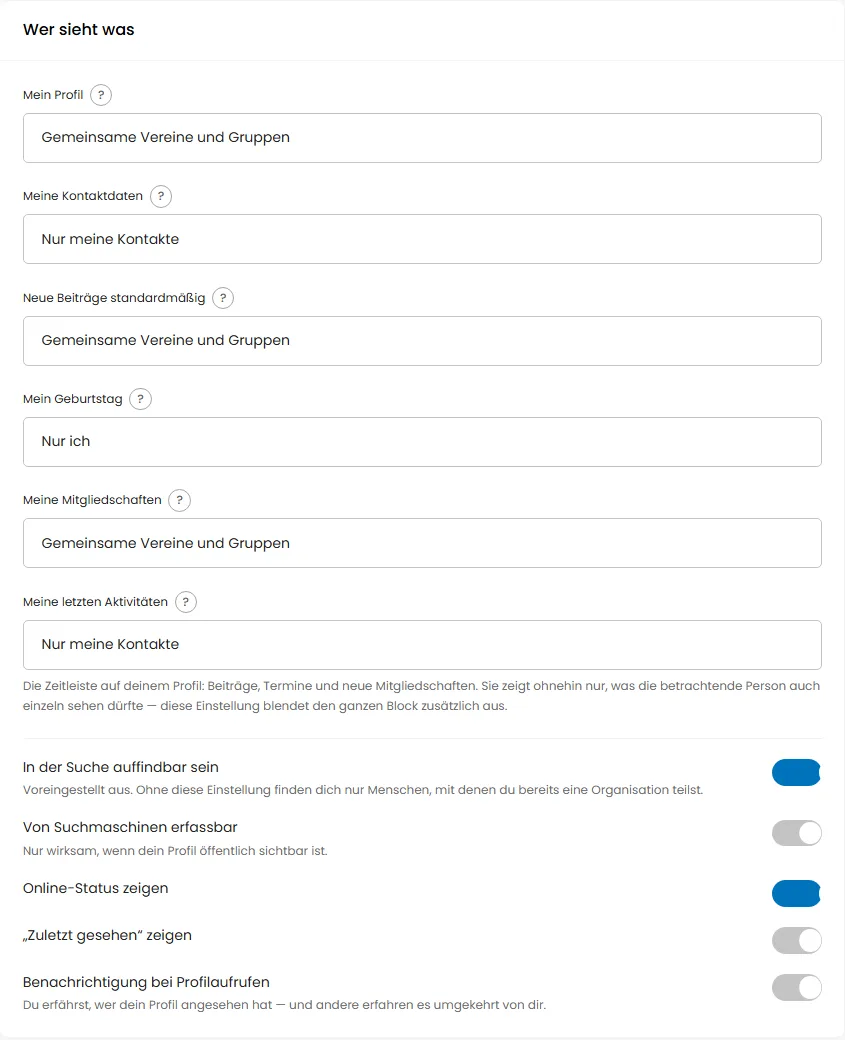
    For your profile, contact details, birthday, memberships and recent activity, you choose individually who may see them. You switch discoverability in search, search engines, online status and “Last seen” separately.

    Privacy settings, Who sees what section: selection fields for My profile, Contact details, Posts, Birthday, Memberships and Activity, plus switches for discoverability and online status.
  33. New

    Adjust accessibility settings

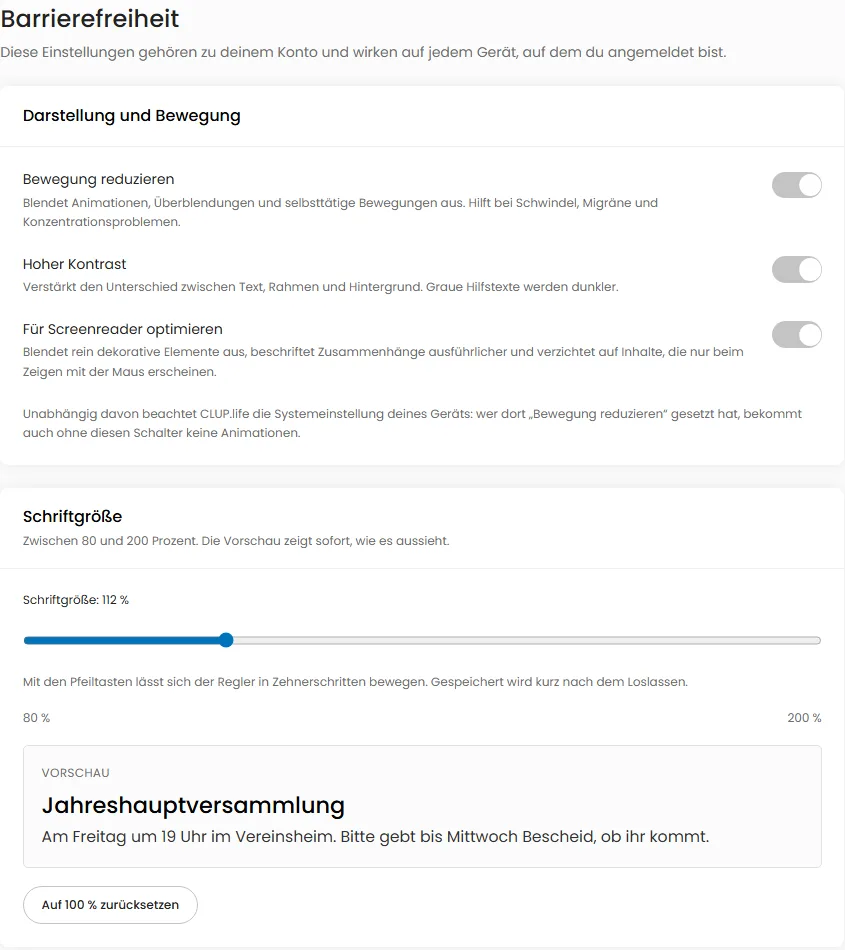
    You can reduce motion, increase contrast, optimize for screen readers and enlarge text between 80 and 200 percent. A preview shows right away what it will look like.

    Accessibility settings with switches for Reduce motion, High contrast and Optimize for screen readers, plus a slider for text size with preview text.
  34. Improved

    Association analytics as a dashboard with filters and analysis

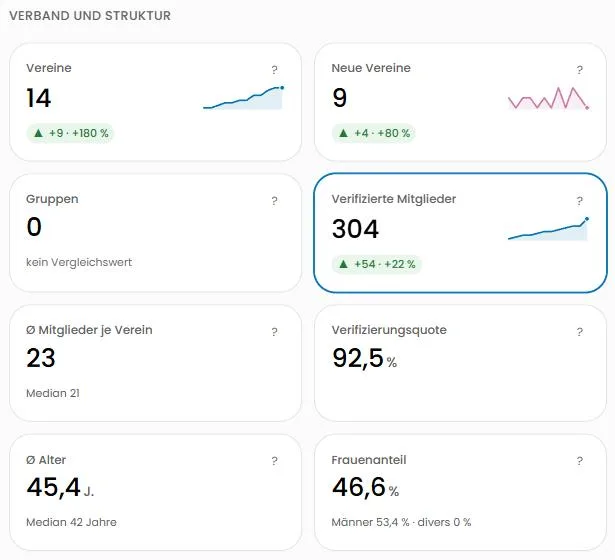
    Associations now see key figures with trends, history, age distribution, cohorts and a club comparison at a glance. Time range, resolution and filters such as category, town, size or age group can be combined, shared by link and exported as CSV or a report. In the analysis you choose how the figures are split; groups of fewer than 5 people stay hidden for privacy.

    Key figure tiles of the association dashboard showing clubs, verified members, average age and small trend lines, sample data of a demo association
  35. New

    File storage with folders and rights

    Clubs, groups and associations now have a file storage with folders, versions, a 30-day trash and search. Leadership decides per folder who may see and edit it; people without access do not see it. 100 MB are free, with Premium 1 GB for clubs or 10 GB for associations.

  36. New

    Calendar subscription for clubs

    Clubs, groups and associations can connect an iCal calendar, for example from Google Calendar, Outlook or Nextcloud. Events are imported automatically and kept up to date. No participant data is imported.

  37. Improved

    Reorganized menu

    The menu now follows what you want to do: Home, Discover, Calendar, Chats and My clubs on top, everything personal under “Me” (on your phone: “More”). Settings are grouped, and leadership and moderation tools stand apart. Large screens get a collapsible sidebar.

  38. New

    Credentials and details: managed by you, shared selectively

    You now manage your qualifications, your enhanced criminal record certificate, and your allergies and diet yourself under Settings. You share them with a club or group selectively – with a purpose and an expiry date, revocable at any time. The club sees only what you share; at events, allergies appear as numbers, with names only for life-threatening allergies and only with your express permission.

  39. New

    Pricing: free is fully featured, Premium adds more

    The new Pricing page shows what stays free and what Premium adds – for you, your club, associations and municipalities. Prices are shown with and without VAT, and associations can calculate their connection fee on the spot.

  40. New

    Book and cancel Premium and view invoices

    You now book Premium directly in the app and pay securely with Stripe. Under “Subscription & payment” you see the status, the next charge and your invoices, and you can cancel or withdraw – cancellation also works without signing in under “Cancel contracts here”. Clubs and associations find everything under “Subscription & invoices”; clubs can also receive sponsor payments on their own Stripe account.

  41. New

    Quick actions in notifications

    You can now answer join requests, connection requests and event invitations directly in the notification: accept or decline, RSVP yes or no, without switching pages. The buttons disappear as soon as the matter is settled.

  42. New

    Donation receipts directly in CLUP.life

    Non-profit clubs can now issue donation receipts in the official format themselves: check them in a preview first, then issue, hand out as a PDF or send electronically to the person. Cancellation with a replacement receipt and ten-year retention are built in; members download their receipts under Settings. The series function for all donors of a year is Premium.

  43. New

    Sponsorship packages for clubs

    Clubs offer sponsors packages – such as a logo next to the club logo or a Premium sponsorship – and invite them by link and QR code. Sponsors post their own funding offers. No advertising in the network; sponsors are named only with both sides' consent.

  44. Improved

    Search with quick filters, counts and preview

    Above the results you find filter pills such as town, category and age, each tab shows its result count, and a preview shows the key details of a club or event without leaving the page. Matching events now also appear in the search box at the top.

  45. New

    Accessibility statement and report form

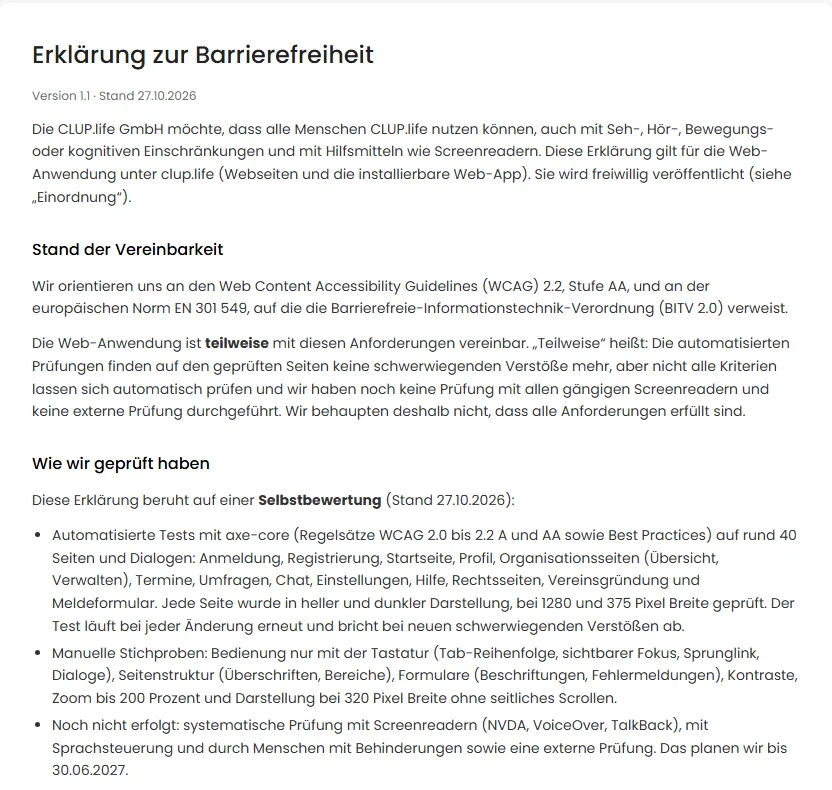
    The CLUP.life accessibility statement can be read without signing in and states the audit status honestly. If you notice a barrier, you can report it through a dedicated form.

    The “Accessibility statement” page with version, date of 10/27/2026 and the sections Status of compliance and How we tested.
  46. New

    CLUP.life is now available in English

    You can now use the whole platform in German or English. Choose your language under Settings → Account or at the bottom of any page; emails and help articles follow your choice. More languages will follow.

  47. Improved

    Consistent pages and clear visibility

    All sub-pages of clubs, federations and groups now share one layout. A badge on every page shows who may see it. Admins set the visibility of events, news, groups and facilities themselves and see under Manage who sees what.

  48. New

    Local partners: sponsors supporting clubs nearby

    Companies, municipalities and foundations can register as sponsors and support clubs in their region. Only sponsors that have been approved and agreed themselves are listed; clubs decide whom they name. Sponsors see anonymized figures only, never member data.

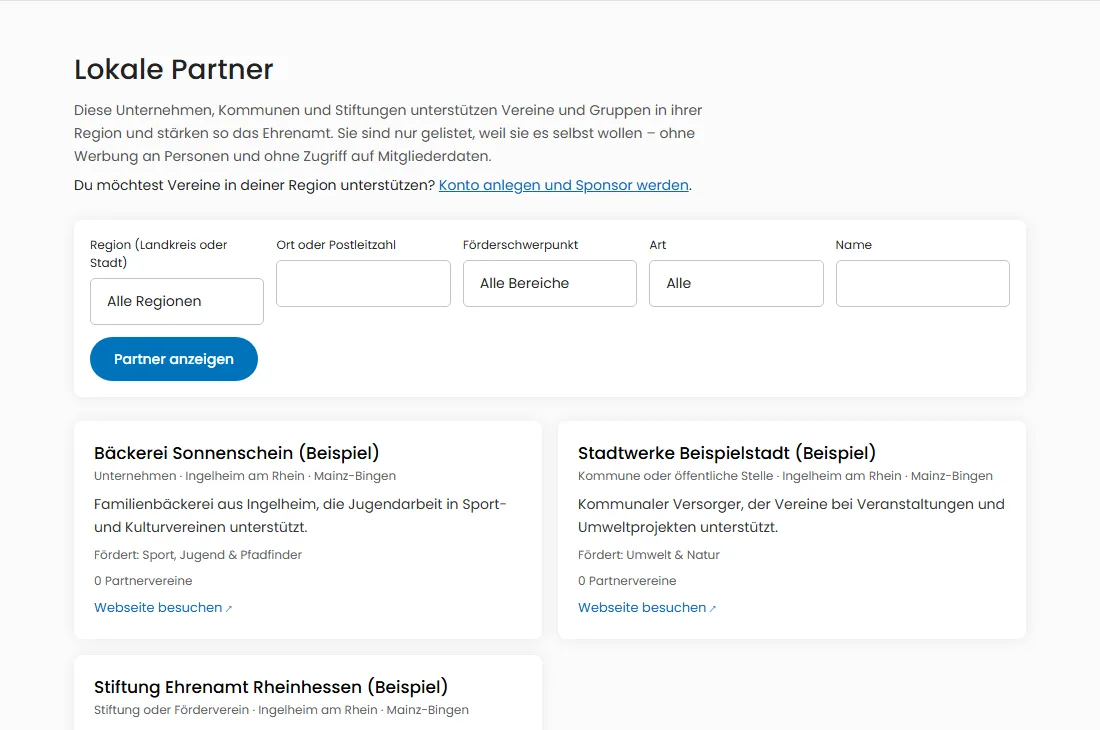
    Public Local Partners page with filters for region, place, focus area and type, and three example sponsors
  49. New

    Find people on the “People” tab

    On the new “People” tab in search, you can find people who have made themselves discoverable, by name or within a shared club. Results are never filtered by age, gender or place of residence, and children do not appear.

  50. Improved

    Filter more precisely: postal code areas, meeting times and more

    The search filters now support postal code areas and group meeting times by weekday and time of day. For events, you can also filter by weekday, time of day, price and accessibility. All filters are part of the page address and can be shared.

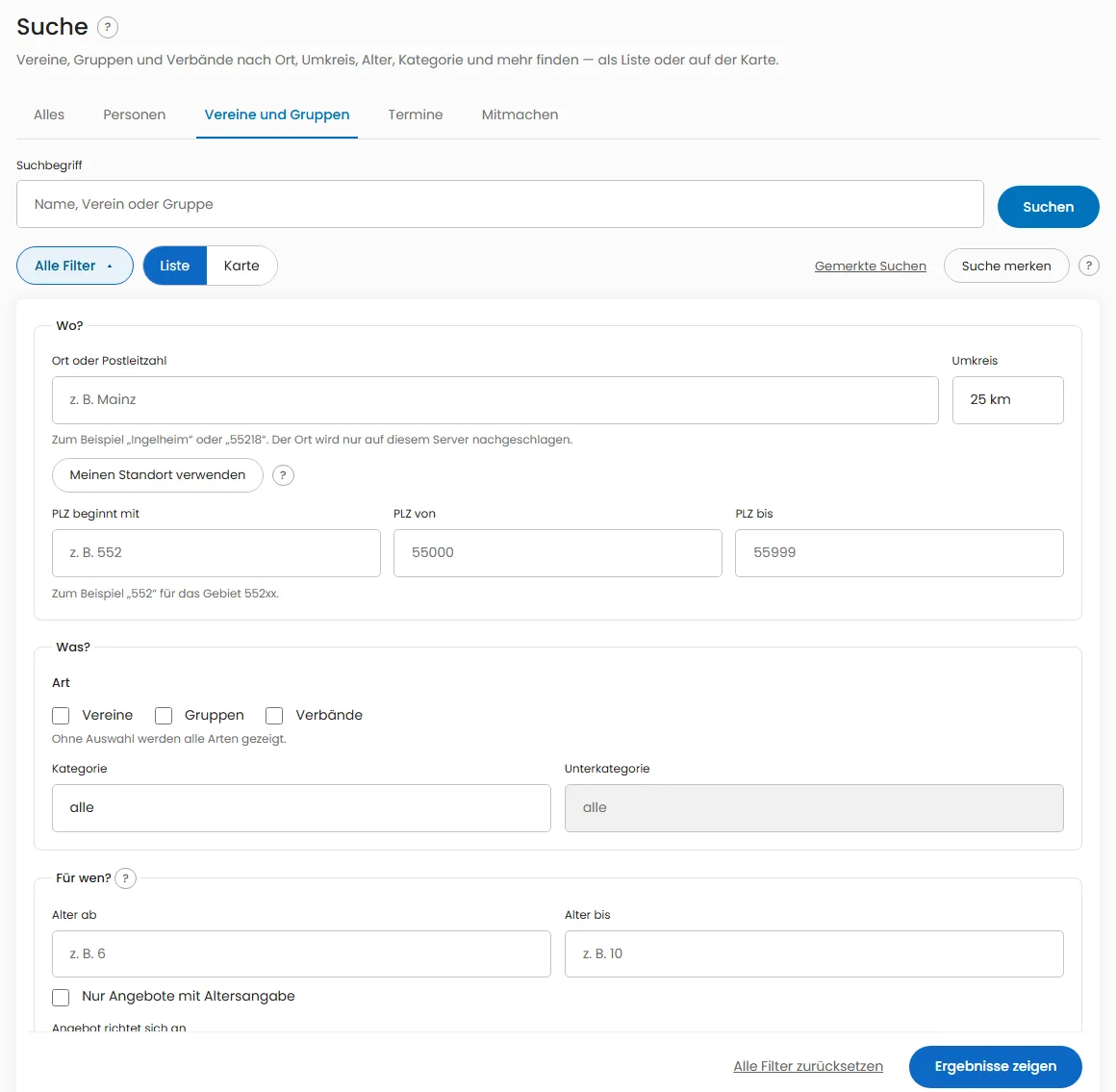
    The open search filter panel with the sections Where, What and For whom: town or postal code with radius, postal code starts with, postal code from and to, type, category and age.
  51. Improved

    Search box: “Search specifically for”

    When you click the search box at the top, “Search specifically for” immediately shows the search targets People, Clubs and groups, Events and Get involved. You land in the right search before you have typed anything.

  52. New

    Find clubs and groups on the map

    In search, “List | Map” switches to a map that shows clubs, groups and associations as markers. The radius around your town or postal code narrows the results. The map loads nothing from outside at first.

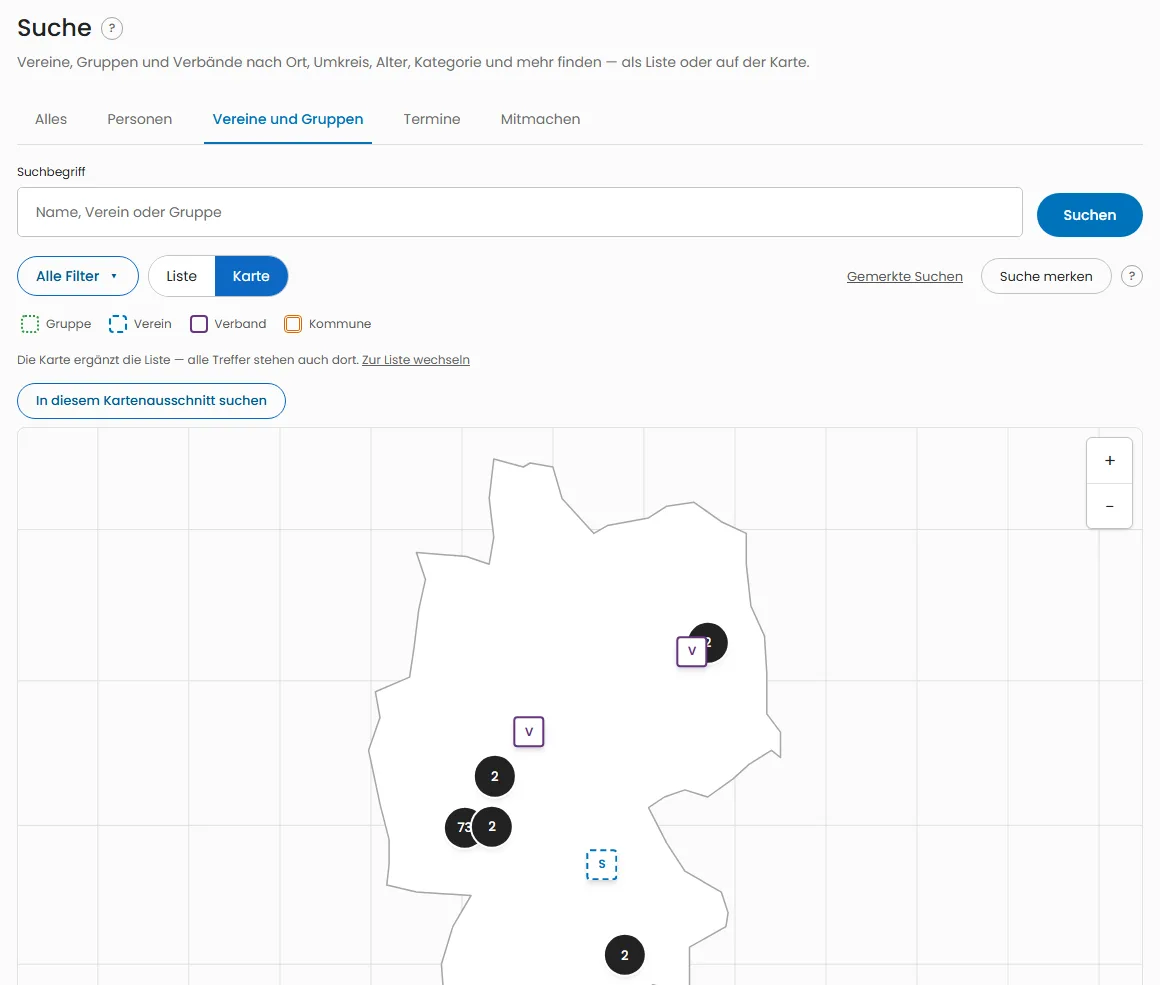
    Search on the Clubs and groups tab with a map: an outline map of Germany with markers for associations and clubs and a legend for group, club, association and municipality.
What’s new at CLUP.life · CLUP.life